What you can do with a login
The OGA website as a whole doesn’t have a login capability, so we’ve had to add one for the Boat Register and Members area. We know this is a bit confusing, but we don’t want the Boat Register to be a completely different site.
Anyone can have a login, whether they are a member or not. There are currently three ‘levels’ of login:
- People who have signed-up for a login but are not members, or who haven’t been identified as a member
- Members
- The Boat Register Editors
People all three categories don’t have to provide an email address when filling in the contact forms as we already know the email address they used to sign-up.
Members get to see the ownership records of boats and use the ‘Fleets’ feature. Members who own boats, get to put their boats up for sale. We want to add more and more things members can do.
As Boat Register editors there are a few more things we can do. For example, the default sorting order on the online register is called ‘Editor’s Choice’. We get to set that.
We’ve also made it easier to fill in forms like registering for RBC60, but you DON’T HAVE TO LOGIN.
How to get a login
There are several pages on the site that provide the login/sign-up button. It looks like this:
One such page is https://www.oga.org.uk/boat_register/browse_the_register/index.html
When you click this button for the first time you get taken away from the OGA website to a form on the site of our authentication provider auth0.com. The URL will look something like https://dev-uf87e942.eu.auth0.com/login with lots following that. We use a separate authentication provider to make sure we comply with the privacy legislation and to secure your data.
The sign-in form looks like this:
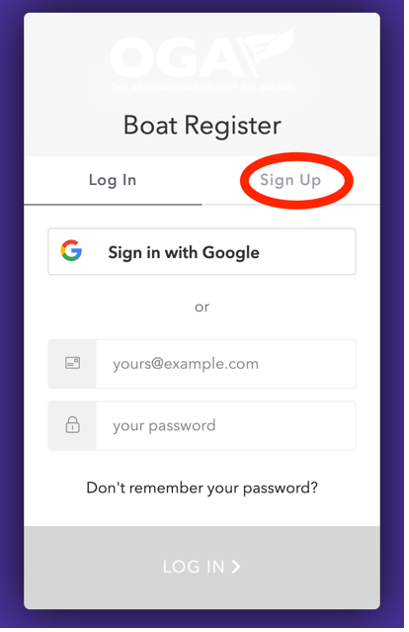
The sign-up option is on the right where the red oval is in the picture. Click that and the form changes to:

Now you can either enter an email address and a password you chose or you can use an existing Google account.
Once you have entered your email and password or gone through the Google process you can click the ‘sign up’ button at the bottom of the form. This should take you back to the boat register and the login button should have become a logout button, something like this:
Auth0.com will also have sent you an email with a link. This email sometimes goes into SPAM so look out for it there. Click on the link to verify that the email address you signed up with is really yours.
At this point, if you used the same email address that we have in the OGA membership database, the system will associate your boat register login with your membership and you will get the members-only experience of the boat register.
If you use a different email address, you will need to email boatregister@oga.org.uk. We will sort that out.
Problems with Logging in or seeing member-only data
If you had a log-in on the old OGA website, we haven’t been able to carry that across to the current one. Please sign-up.
If you created a login but can’t get the login/sign-up button to change to a logout button, email us and we will get in touch to help.
If you are a member but are not seeing the members only features, either you are not logged in, or your login is not associated with your membership.
If you have this problem and you are logged in, you should see a green button. Click this and we will sort it.
The two most common reasons are:
- You used a different email for your login than the one we have on record
- You are a new member and your membership details are still working through the system